

The best wardrobe app depends on what you want it to do. Whering is the free pick with a community, Indyx the one with human stylists, Acloset the one that imports your purchase history, and Google Photos Wardrobe builds a closet from photos you already have.
Clottr is our app, so weigh its section accordingly. We’ve tried to be as fair to the others as to ourselves. We first published this comparison in September 2026 and have since re-checked every app against its store listing, website and announcements, with a link to the source for each fact. What changed is listed near the end.
What a wardrobe app should do
Four things decide whether you’ll still open a wardrobe app after the first week:
- Getting clothes in: if adding your closet takes a weekend, nothing else matters.
- Daily outfits: a suggestion that knows the weather and, ideally, your day.
- Seeing it on you: try-on on your own photo, or at least an avatar of you.
- Packing: a trip planned as outfits per day, not only a checklist.
The 6 wardrobe apps at a glance
| App | Best for | Platforms | Try-on | Getting clothes in | Price (US) |
|---|---|---|---|---|---|
| Whering | A free app with a community | iOS, Android, web, Chrome extension | From a photo of you, paid with credits | Photos in batches, a 100M-item database, a Chrome extension | Free; credits for try-on |
| Indyx | Human stylists who work from your closet | iOS, Android | Virtual Selfies from one photo (Insider) | Photos with automatic tags, forwarded receipts, product links | Free; Insider $12.99/mo or $74.99/yr |
| Acloset | Importing a big closet for you | iOS, Android, Chrome extension | On an AI avatar made from your photo | Purchase history, Gmail receipts, up to 4 items from one mirror selfie | Free up to 100 items, then from $3.99/mo |
| Pureple | Outfit combinations and community styling | iOS, Android | On your photo or a model (Pro, iOS) | Whole Closet Scan reads several items from one closet photo, reviewed as thumbnails (Pro, iOS); otherwise one at a time | Free with ads; Pro from $6.99/wk |
| Google Photos Wardrobe | A closet built from your photos | Android, iOS (US, India, Brazil) | Yes, on you | Built from your photo library | Google AI Pro ($19.99/mo), Ultra or selected users |
| Clottr | Try-on on your own photo, outfits from styling rules | iOS, Android (coming soon), browser extension | Your selfie, your real face | One piece, a rack or a worn outfit per photo | Coming soon: free tier + optional paid plan |
Prices from US App Store listings or the company’s own site, checked October 29, 2026. They change often.
Whering
Whering says it has 10 million users. It said so in July 2026, when it raised $7 million and named try-on as one of the things the money is for (tech.eu). Its help center now lists Virtual Try On: upload a photo of yourself, pick an outfit from your wardrobe, and it generates an image of you wearing it (Whering).
Clothes go in by photo, in batches, with backgrounds removed and tags you review; from a database of over 100 million items; or from retailer sites with its Chrome extension. “Dress Me” shuffles outfits from your closet, and “W Pick” suggests up to six a day from your style history and the weather. For a trip you pick outfits or items for each day and it builds the packing list from them (Whering). Its standout is the community: share your wardrobe, style your friends’ clothes and browse public wardrobes. The core app is free; try-on is paid with credits, and there are optional supporter purchases.
The catch: try-on costs credits on top of the free app.
Indyx
Indyx bets on people. The closet is free with unlimited items, background removal and automatic tags for category, subcategory and color; its own guides estimate about 2 minutes per item, and its own pages put a full wardrobe at four to eight hours. It has added shortcuts: forward your order emails, add a piece from a product link, or pay a professional Archivist to catalog your closet at home ($295 for about 100 items, then $2 per item, in select US cities). The styling comes from human stylists who work from your wardrobe: a Lookbook of 10 outfits from $150, or a Mini of 3 outfits from $60 (Indyx).
In 2026 it added Virtual Selfies, which shows you in any saved outfit from one reference photo, for Insider members ($12.99 a month or $74.99 a year) (Indyx). Packing lists are free.
The catch: no AI outfit suggestions, by design, and cataloging a closet takes hours unless you pay for the Archivist.
Acloset
Acloset, from South Korea, is built around getting clothes in. It imports purchase history from Amazon, Zara, Shein and other stores, reads Gmail receipts, picks up to four items out of one mirror selfie, and its Chrome extension saves clothes from shop pages (Acloset). Style Chat suggests outfits from your closet and the weather, and “Try On” dresses an AI avatar made from your photo; its 2026 updates keep the avatar’s face and body closer to yours. Packing is weather-based, and cost per wear is built in.
It’s free up to 100 items. After that, Basic is $3.99 a month or $27.99 a year, Premium $9.99 a month or $59.99 a year, and Expert $147.99 a year or $24.99 a month.
The catch: past 100 items it’s a subscription, and the free plan carries ads (Acloset).
Pureple
With Pro on iOS, Pureple’s try-on works on your own photo or on a model. Whole Closet Scan, also Pro on iOS, detects several items from one closet photo; you review them, fix names, categories and colors, and they start as descriptive thumbnails until you add item photos. Pureple says availability varies by region and app version, and its FAQ doesn’t mention either feature on Android (Pureple). It categorizes items automatically, and adding items and saving manual outfits are free with no limit. AI Style Me outfit suggestions are Pro, on iOS and Android. Packing lists and an outfit calendar are Pro on iOS. An opt-in community styling feature lets friends and other members build outfits from your wardrobe. AI outfit feedback (Pro, iOS) comments on an outfit photo, and closet statistics (Pro, iOS) cover most- and least-worn items, cost per wear and closet value.
The free version shows ads (Google Play). Pro is $6.99 a week, $14.99 a month or $89.99 a year (App Store).
The catch: most of the smart features sit behind Pro.
Google Photos Wardrobe
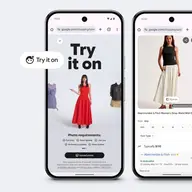
Google announced Wardrobe in Google Photos on April 29, 2026. It scans photos of you and builds a closet from them without you adding anything; you assemble outfits yourself, up to six items, and “Try it on” shows you wearing them (Google). It reached Android in June and iOS on September 24 (TechCrunch), in the US, India and Brazil, for Google AI Pro ($19.99 a month in the US) and Ultra subscribers and selected users.
The catch: it only knows clothes you’ve been photographed in, and it has no calendar or packing yet.
Clottr

Clottr is the one we build, coming soon for iOS and Android with a browser extension. What it does, and what it doesn’t:
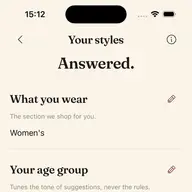
- On you: virtual try-on renders clothes on your own selfie and keeps your real face, for pieces you own or from any online store: paste a link, upload a screenshot, or use the browser extension. It shows how the look comes together on your body, not your size or exactly how it will fit.
- Getting clothes in: photograph one piece, a whole rack or an outfit you’re wearing, and each garment is pulled out, its background removed and tagged.
- Daily outfits: Daily Fit picks an outfit from your own closet each morning, for the forecast and, if you connect it, your calendar. A rules engine builds and scores the outfits (color harmony, proportion, formality, occasion and more); the AI catalogs your closet and renders the try-ons. See how the outfit planner works.
- Packing: the trip planner builds an outfit for each day of a trip and turns them into one packing list.
There will be a free tier and an optional paid plan. The catch: you can’t download it yet, and it can’t import your purchase history. Acloset does that better today.
Which wardrobe app should you use?
- Free, with a community: Whering.
- A human stylist working from your closet: Indyx.
- A big closet you don’t want to photograph: Acloset, for purchase history and receipts.
- Outfit combinations and community styling: Pureple.
- You live in the US, India or Brazil and have years of photos: try Google Photos Wardrobe before you photograph anything.
- Try-on on your own photo, with your real face, plus daily outfits from styling rules: join the Clottr waitlist.
For more, see the best AI stylist apps and the best outfit planner apps, compared the same way.
What changed since we first published
October 29, 2026: corrected Pureple’s try-on and closet import after Pureple pointed us to its FAQ, and its plan’s name (Pro); updated Acloset’s and Pureple’s figures: Acloset 8 million by its own site (its store listings still say 4 million), Pureple reports 4 million downloads in its FAQ and 3M+ users in its store listings; corrected Google Photos Wardrobe (you assemble outfits yourself), Indyx’s setup time, and W Pick, which no Whering page we found labels beta; re-read every row.
October 27, 2026:
- Indyx added Virtual Selfies: try-on of your saved outfits from one reference photo, for Insider members (Indyx).
- Acloset added try-on on an AI avatar of you, a Chrome extension that saves clothes from shop pages, and Gmail receipt import (Acloset).
- Whering raised $7 million in July 2026, says it has 10 million users (tech.eu), and has added Virtual Try On, paid with credits (Whering). We first wrote that it had no try-on.
- Google entered the category with Wardrobe in Google Photos (Google).
- Pureple is not the biggest community, as we first wrote: Whering and Acloset both report more users (Acloset).
- We dropped our design ratings (“may feel a bit dated” and the like). They were our opinion, not something you can check.
Frequently asked questions
What is the best wardrobe app in 2026?
It depends on what you want. Whering is the free pick with a community, Indyx the one with human stylists, Acloset the one that imports your purchase history and now has avatar try-on, and Pureple offers try-on on your photo or on a model (Pro, iOS). Clottr, coming soon, is built for try-on on your own photo and daily outfits from styling rules.
Which wardrobe app has virtual try-on?
Clottr renders clothes on your own selfie and keeps your real face. Google Photos Wardrobe tries outfits on you, Indyx shows your saved outfits on you from one reference photo for Insider members, Whering generates an image of you from your photo, paid with credits, Acloset dresses an AI avatar made from your photo, and Pureple offers try-on on your photo or on a model (Pro, iOS).
What is the fastest wardrobe app to set up?
Acloset imports purchase history and Gmail receipts and picks up to 4 items out of one mirror selfie; Google Photos Wardrobe builds a closet from your photo library without you adding anything. Whering takes photos in batches, Clottr pulls each garment out of a photo of a rack or an outfit, and Indyx estimates about 2 minutes per item.
Is there a free wardrobe app?
Yes. Whering’s core app is free with no subscription, Indyx’s free tier has unlimited items, Acloset is free up to 100 items, and Pureple is free with ads, with unlimited items and manual outfits. Clottr will have a free tier.
Which wardrobe apps work on Android?
Whering, Indyx, Acloset and Pureple all have Android apps, and Google Photos Wardrobe reached Android in June 2026, in the US, India and Brazil. Clottr is coming to Android and iOS, with a browser extension.
Can I try on clothes before buying them online?
Yes. Clottr’s browser extension tries any piece from any online store on your own selfie without leaving the page. Acloset’s and Whering’s extensions save clothes from shop pages into the app, and Google Photos Wardrobe tries on outfits built from your photos.
Sources
- Whering: Whering lands $7M as its platform reaches 10M users (tech.eu, July 7, 2026), read October 29, 2026.
- Whering: Help Center, Virtual Try On, read October 29, 2026.
- Whering: planner and packing list, read October 29, 2026.
- Whering: how many daily outfit suggestions W Pick gives, read October 29, 2026.
- Whering: the web app, read October 29, 2026.
- Indyx: home page and FAQ, read October 29, 2026.
- Indyx: how it works, read October 29, 2026.
- Indyx: Virtual Selfies, read October 29, 2026.
- Indyx: App Store listing and release notes, read October 29, 2026.
- Acloset: Chrome extension, read October 29, 2026.
- Acloset: about Acloset, read October 29, 2026.
- Acloset: freemium pricing, read October 29, 2026.
- Acloset: App Store listing, read October 29, 2026.
- Pureple: Pureple and its FAQ, read October 29, 2026.
- Pureple: App Store listing, read October 29, 2026.
- Pureple: Google Play listing, read October 29, 2026.
- Google Photos: Wardrobe in Google Photos, read October 29, 2026.
- Google Photos: the closet reaches Android and iOS (TechCrunch, September 24, 2026), read October 29, 2026.